
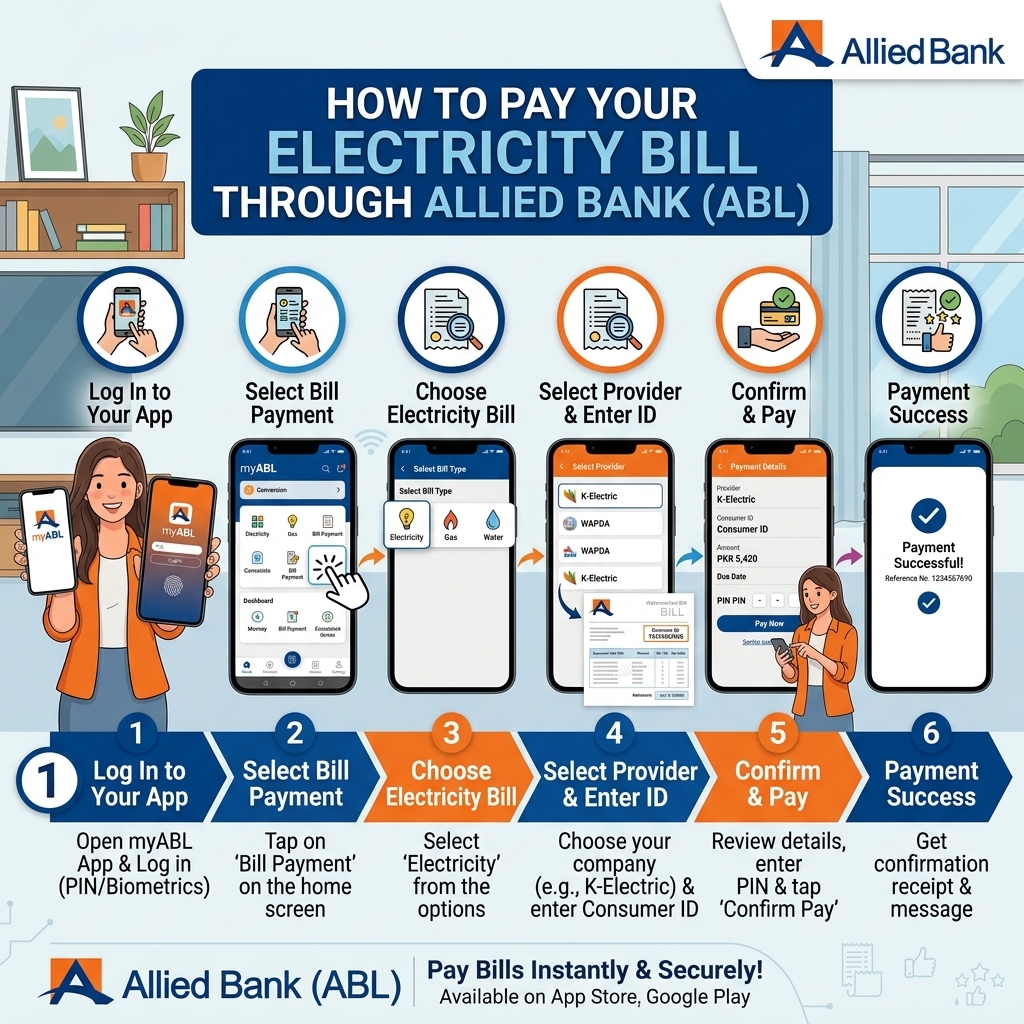
Five Ways to Pay Your Electricity Bill With Allied Bank
Allied Bank (ABL) runs one of the more flexible bill-payment setups among Pakistani banks, covering over 1,000 billers across five different channels — including a phone-call option that most other banks don't offer. This guide covers all of them: myABL Mobile App / Internet Banking, myABL Wallet, ABL ATM, Allied Phone Banking, and myABL WhatsApp Banking.
Quick Summary: Paying Your Bills via Allied Bank
- myABL Mobile App: Log in → Payments → New Payments → Utility → select biller → enter reference → fetch bill → confirm → OTP.
- myABL Internet Banking: Log in → Bill Payments → New Biller → Utility → select company → enter reference → OTP → confirm.
- myABL Wallet App: Log in → Bill Payments → select category & company → enter reference → OTP → confirm.
- ATM: Insert card → Other Transactions → Payments/Donations → select biller → enter reference → confirm → collect receipt.
- Phone Banking: Dial 042‑111‑225‑225 → follow IVR/agent → provide card & bill details → confirm.
- Branch: Visit an Allied Bank branch with bill/reference → pay in cash/debit → get stamped receipt.
All methods are secure and give you a digital/SMS/printed receipt for proof.
Method 1: myABL Mobile App or Internet Banking (For ABL Account Holders)
The main option for existing Allied Bank customers.
- If you haven't already, register at myABL.com or download the myABL app from the Google Play Store, Apple App Store, or Huawei App Gallery.
- Log in using your username and password.
- Tap the Bill Payments icon on the homepage.
- Select New Biller with category Utility, then choose your DISCO — LESCO, FESCO, MEPCO, GEPCO, PESCO, HESCO, QESCO, TESCO, HAZECO, SEPCO, IESCO — or K-Electric.
- Enter your 14- or 15-digit reference number (or the 13-digit account number for K-Electric), usually found in the middle of your bill.
- Confirm the amount, then authorize with your Transaction PIN. You'll receive an OTP on your registered mobile number or email to complete authentication.
- Once confirmed, scroll down on the payment status page to see the result, and you'll get a digital confirmation.
Good to know: ABL supports partial bill payment through myABL — a genuinely useful feature if you're short on funds one month and want to pay part of a large bill now and the rest before the due date, rather than paying nothing at all.
Method 2: myABL Wallet (No Traditional Bank Account Needed)
myABL Wallet is Allied Bank's branchless banking option, built specifically for Pakistan's unbanked population — a good fit if you don't want to open a formal ABL account.
- Download the myABL Wallet app from the Google Play Store, Apple App Store, or Huawei App Gallery, and open your branchless banking account using just your CNIC and mobile number.
- Log in using your credentials.
- Tap Bill Payments on the homepage.
- Select your DISCO or K-Electric, then enter your reference number.
- Confirm the amount and authorize the payment.
- You'll receive a confirmation once the transaction completes — keep it as proof of payment.
Good for: anyone without a traditional bank account who still wants a fully digital, app-based way to pay bills — similar in spirit to UBL Omni or Konnect by HBL.
Method 3: ABL ATM
Available 24/7 for Allied Bank debit cardholders.
- Insert your Allied Bank Debit Card into any ABL ATM and enter your PIN.
- After verification, select Other Transactions, then Payments/Donations.
- Choose your DISCO or K-Electric from the list of billers.
- Enter your consumer/reference number — the verification screen will show your account details for confirmation.
- Click Proceed to complete the payment.
- A receipt is printed automatically once the payment succeeds — keep it as your proof of payment.
Method 4: Allied Phone Banking (Pay by Phone Call)
An option most other banks don't offer — paying your bill entirely over a phone call, without opening an app at all.
- Dial the Allied Phone Banking UAN: 042-111-225-225, available 24/7.
- Let the agent know you'd like to pay a utility bill.
- Provide your DISCO name and reference number as requested.
- Complete authentication as guided by the agent.
- The payment is processed on the call, and you'll receive confirmation via SMS.
Note: You need an active Allied Bank Debit Card to use the Bill Payment via Phone Banking service. Allied Bank's outbound calls to customers come from the number 1222, worth knowing so you can recognize genuine calls from ABL.
Method 5: myABL WhatsApp Banking
Mainly useful for quick account checks, but worth knowing about if you already use it for other banking tasks.
- Save the myABL WhatsApp number: 0300 1225225 to your contacts.
- Message it directly from your registered mobile number.
- Use it for balance inquiries or mini statements without visiting a branch or ATM — a convenient way to confirm your account has sufficient funds before making a bill payment through one of the other methods above.
Which ABL Method Should You Use?
| Method | Best For | Need an ABL Account? |
|---|---|---|
| myABL App / Internet Banking | Full-featured payments, partial bill payment | Yes |
| myABL Wallet | No traditional bank account | No (Wallet account only) |
| ABL ATM | Quick in-person payment, 24/7 access | Yes (ABL debit card) |
| Allied Phone Banking | Paying by phone call, no app needed | Yes (ABL debit card) |
| myABL WhatsApp Banking | Balance checks before paying elsewhere | Yes |