
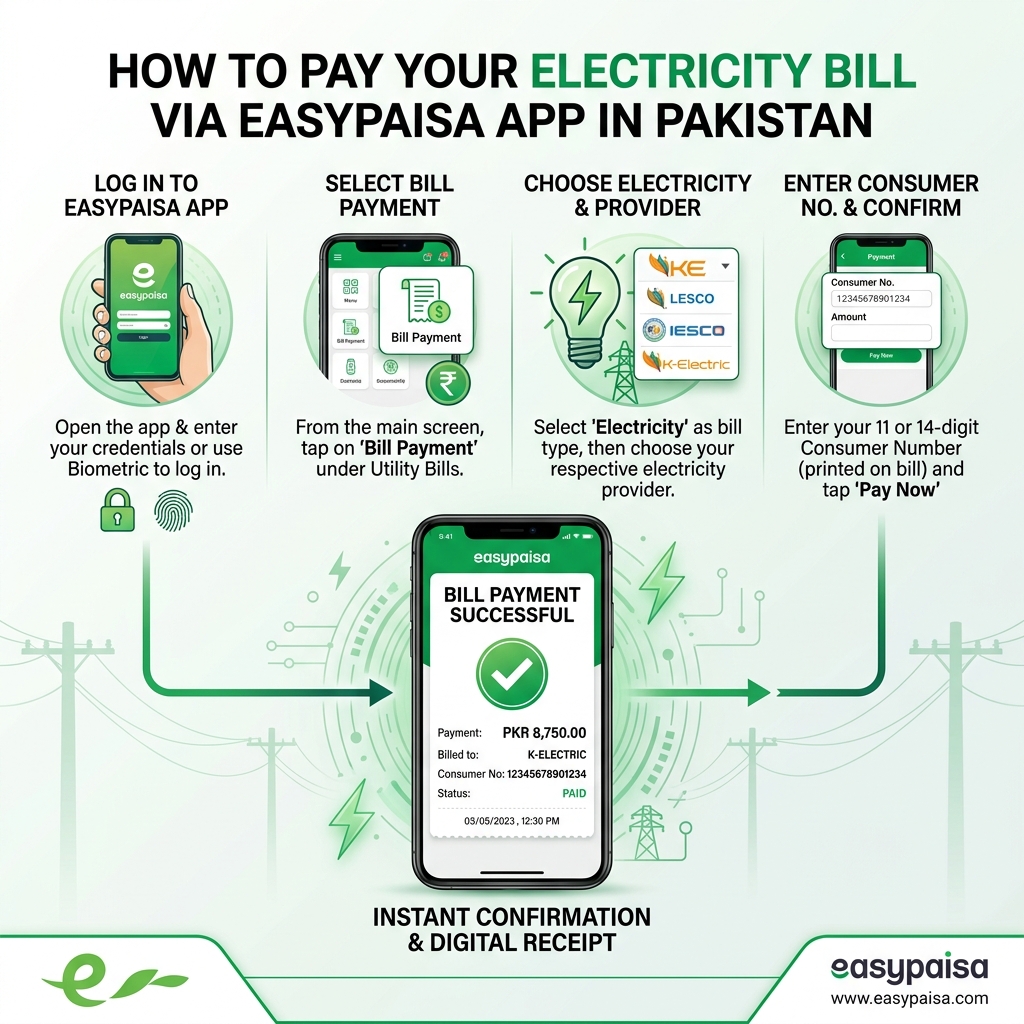
Pay Your Electricity Bill Through Easypaisa in Under 2 Minutes
Easypaisa is one of Pakistan's most widely used digital payment platforms, and since January 2025 it operates as Easypaisa Bank Limited, Pakistan's first licensed Digital Retail Bank — a step up from its earlier status as a mobile wallet. That change hasn't affected how ordinary bill payments work; it just means your Easypaisa account now sits on the same regulatory footing as a conventional bank account.
Before You Start – What You Need to Pay via EasyPaisa
Make sure you have:
- An EasyPaisa Mobile Account (with 5‑digit PIN set) or access to an EasyPaisa retailer/shop.
- Your electricity bill or at least your reference/account number:
- Most DISCOs: 14‑digit reference number
- K‑Electric: 13‑digit account number
- Sufficient balance in your EasyPaisa account or cash to pay at a retailer.
Method 1: Pay Through the Easypaisa App
The quickest option if you have a smartphone and a data connection.
- Open the Easypaisa app and log in with your registered mobile number and PIN.
- Tap 'Bill Payments' on the home screen, which is the second icon in the first row.
- Select Electricity from the list of bill categories (Mostly first icon in the form of bulb).
- Choose your DISCO in the Dropdown list— PESCO, HESCO, QESCO, TESCO, HAZECO, LESCO, FESCO, IESCO, MEPCO, SEPCO, GEPCO, K-Electric
- Enter your 14-digit reference number (or the 13-digit account number for K-Electric).
- Your bill's amount and due date load automatically — check they match your actual bill before continuing.
- Tap Pay, then enter your PIN to authorize the transaction.
- You'll receive an instant success screen along with a confirmation SMS carrying a transaction ID — save this as your proof of payment.
New to Easypaisa? You can open an account directly in the app, or by dialing *786#, using just your CNIC and a mobile number on any network — Jazz, Ufone, Zong, or Telenor.
Pay Electricity Bill via EasyPaisa USSD (786# / 2262#) – No App Needed
Use this if you have a feature phone or don’t want to use the app.
For Telenor / EasyPaisa SIM Users
- From your Telenor/EasyPaisa SIM, dial: *786# and press call.
- From the menu, select “Bill Payment”.
- Choose “Electricity”.
- Select your DISCO (e.g., LESCO, IESCO, K‑Electric, PESCO, etc.).
- Enter your 14‑digit reference number (or 13‑digit for K‑Electric).
- Confirm the amount and pay using your 5‑digit PIN.
- Save the SMS confirmation as your receipt.
For Other Networks (Jazz, Zong, Ufone, etc.)
- Dial *2262# and follow similar steps:
Bill Payment → Electricity → DISCO → reference → confirm → PIN.
USSD payments are usually free and settle within 30 minutes, but can take longer depending on the DISCO.
Method 3: Pay by SMS
A lesser-known option, useful for a very quick payment without navigating any menu.
- Compose a text message in the format:
BILL WAPDA <amount>(adjust the keyword and amount as prompted by your specific DISCO's billing setup). - Send it to 7878.
- You'll receive a confirmation message once the payment is processed.
This method is best used once you're already familiar with your usual bill amount and reference number, since it requires typing the details manually rather than pulling them up automatically.
Method 4: Pay Through an Easypaisa Agent
Easypaisa has one of the densest retail agent networks in Pakistan — recognizable by their green signboards — making this a strong option for anyone who prefers to pay in cash without using the app.
- Find a nearby Easypaisa shop or retailer — these are extremely common in every city and town, often more numerous than JazzCash agents.
- Hand over your electricity bill (paper copy or your Bill Check Online printout) along with cash for the due amount.
- The retailer enters your reference number and processes the payment through their own Easypaisa terminal.
- You'll receive a printed receipt from the agent and typically a confirmation SMS as well.
Good for: elderly family members, anyone uncomfortable with app-based payments, or situations where you'd rather hand over cash and let someone else handle the digital side.
EasyPaisa Bill Payment Charges & Limits
- Service charge: EasyPaisa does not charge extra for utility bill payments via app, USSD or retailers (standard DISCO rules apply).
- Transaction limits:
- App: up to Rs. 250,000 per transaction (subject to your account tier and KYC level).
- USSD (786# / 2262#): up to Rs. 25,000 per transaction (may vary by account level).
- Retailer: typically up to Rs. 50,000 per bill.
Always check your current limits in the EasyPaisa app or with your retailer.
What If Something Goes Wrong?
- Payment deducted but no confirmation received: Open the app and check Transaction History. If it shows "Successful," the payment went through even if the SMS was delayed — a common, harmless lag.
- Bill still shows unpaid after paying: Wait the full 1–3 hour processing window (longer near due dates) before assuming there's a problem. If it's still unresolved after 24 hours, contact Easypaisa support with your transaction ID.
- Amount on screen doesn't match your bill: Don't proceed — verify against your actual bill or a fresh Bill Check Online lookup first, since this usually points to an outdated reference number rather than an app error.
Tips to Pay Your Electricity Bill Safely via EasyPaisa
- Always double‑check the DISCO name and reference number before paying.
- Compare the consumer name shown in the app with your bill.
- Save the transaction ID and SMS receipt until the next bill shows “paid”.
- Use the official EasyPaisa app from Google Play / App Store; avoid third‑party apps.
- Keep your 5‑digit PIN secret; never share it with anyone, including retailers