
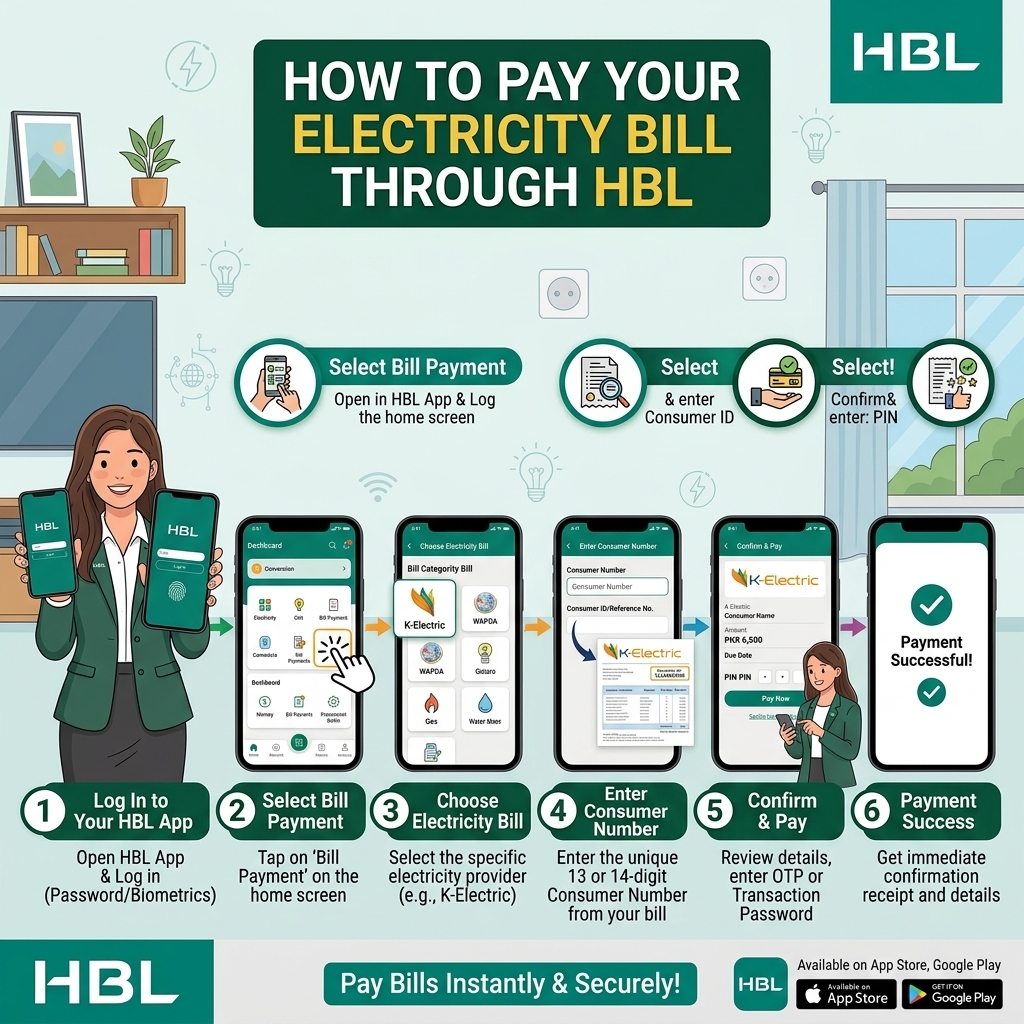
Four Ways to Pay Your Electricity Bill With HBL
HBL is Pakistan's largest bank by branch network — over 1,700 branches and 2,000+ ATMs nationwide — and it offers more ways to pay a utility bill than almost any other bank. Whether you're an HBL account holder, a Konnect wallet user, or don't bank with HBL at all, there's a route that works for you. This guide covers all four: HBL Mobile app, Konnect by HBL, HBL ATMs, and the HBL Pay Billing Portal — the last of which doesn't require an HBL account at all.
Method 1: Pay Bills Using HBL Mobile App (For HBL Account Holders)
Best for HBL customers who want full control, saved billers, and instant SMS receipt.
Step 1 – Download & Log In to HBL Mobile
- Download the HBL Mobile app from Google Play or App Store.
- Open the app and log in with your user ID and password/MPIN (as set up during registration).
Step 2 – Go to “Payments” → “Bill Payment”
From the home screen:
- Tap “Payments” (or the Payments icon).
- Then tap “Bill Payment” or “Utility Bills”.
Step 3 – Select Bill Type
Choose the type of bill you want to pay:
- Electricity (LESCO, FESCO, MEPCO, GEPCO, PESCO, HESCO, QESCO, TESCO, HAZECO, SEPCO, IESCO — or K-Electric.)
- Gas (SSGC, SNGPL)
- Water (WASA, etc.)
- Internet / Broadband (PTCL, StormFiber, etc.)
- Telephone (Landline)
- Mobile Postpaid
Step 4 – Select Company / Biller
From the list, select your specific company, for example:
- K‑Electric, PESCO, HESCO, QESCO, TESCO, HAZECO, LESCO, FESCO, IESCO, MEPCO, etc.
- SNGPL, SSGC for gas
- PTCL, StormFiber, etc.
Step 5 – Enter Reference / Account / Consumer Number
- Enter your 14‑digit reference number (for most DISCOs) or 13‑digit account number (for K‑Electric), or the consumer number shown on your gas/water/PTCL bill.
- Tap “Next” or “Fetch Bill”.
The app will fetch your bill details from the biller’s system.
Step 6 – Review Bill Details
Check on screen:
- Consumer name
- Bill amount
- Due date
- Billing month (if shown)
If anything looks wrong, do not proceed. Compare with your printed bill or re‑check the reference number.
Step 7 – Enter Amount and Confirm Payment
- Enter the amount you want to pay (usually the full “amount due”).
- Select the account from which to debit (if you have multiple accounts).
- Tap “Proceed” or “Pay Now”.
Step 8 – Authorise with OTP / MPIN
- You’ll receive an OTP via SMS on your registered mobile number.
- Enter the OTP (and/or your MPIN if required).
- Tap “Confirm”.
Step 9 – Save Your Receipt
-
After successful payment, you’ll see a confirmation screen with:
- Transaction ID / Reference
- Amount paid
- Date & time
- You’ll also receive an SMS receipt from HBL.
- Save a screenshot or download the receipt from the app for your records.
Method 2: Konnect by HBL (No Bank Account Needed)
Konnect is HBL's branchless banking wallet — your mobile number becomes your account number, and you don't need a traditional HBL bank account to use it.
- Open the Konnect by HBL app and log in (or register with just your CNIC and PTA-registered mobile number if you're new).
- Tap Payments, then select the utility bill option.
- Choose Electricity, then your DISCO or K-Electric.
- Enter your reference number and confirm the loaded bill amount.
- Authorize the payment with your PIN.
- Check your Konnect-registered mobile number for a confirmation SMS from 8425 — this is your official proof of payment.
Good for: anyone who wants HBL's reliability without opening a full bank account, or who prefers a lighter, wallet-style app similar to JazzCash or Easypaisa.
Method 3: HBL ATM
A solid option if you have an HBL debit card and prefer a hands-on, in-person method without visiting a teller.
- Insert your HBL debit card at any HBL ATM (there are over 2,000 nationwide) and enter your PIN.
- Select Bill Payment or Utility Bills from the ATM menu.
- Choose Electricity, then your DISCO or K-Electric.
- Enter your reference number using the ATM keypad.
- Confirm the amount shown on screen.
- Complete the payment and take the printed receipt — keep it as your proof of payment.
Tip: This method is especially useful outside regular banking hours, since ATMs are accessible 24/7 even when branches and customer service lines are closed.
Method 4: HBL Pay Billing Portal (No HBL Account Required)
This is HBL's most flexible option — you don't need to be an HBL customer at all, and it works from anywhere in the world using just a debit or credit card.
- Visit the HBL Pay Billing Portal and register with your basic details.
- Select Electricity from the bill categories (the portal covers 100+ payment partners across multiple categories, not just utilities).
- Choose your DISCO or K-Electric, then enter your reference number.
- Enter your debit or credit card details to complete the payment — any Pakistani or, in many cases, international card is accepted.
- You'll receive a confirmation on-screen and via email or SMS depending on your registered contact details.
Especially useful for: overseas Pakistanis paying a family member's electricity bill back home, or anyone who banks with a different institution entirely but wants a quick, reliable online option.
Which HBL Method Should You Use?
| Method | Best For | Needs HBL Account? |
|---|---|---|
| HBL Mobile | Existing HBL customers managing full banking | Yes |
| Konnect by HBL | Wallet-style convenience, no full bank account | No (Konnect account only) |
| HBL ATM | In-person, 24/7 access with a debit card | Yes (HBL debit card) |
| HBL Pay Billing Portal | Anyone, anywhere — including overseas Pakistanis | No |
HBL Bill Payment Charges & Limits
- Service charge: HBL typically does not charge extra for utility bill payments via HBL Mobile, Internet Banking, or HBL Pay Portal (standard biller rules apply). Some specific billers or card types may have their own charges; always check the fee schedule on HBL’s website/app.
-
Transaction limits:
- Depend on your account type, channel (app/internet/ATM), and security settings.
- Typical daily limits for bill payments via HBL Mobile/Internet Banking can range from Rs. 50,000 to several hundred thousand, depending on your profile and device binding.
Always check your current limits in HBL Mobile → Settings/Profile → Limits or on HBL’s website.
Quick Summary: Paying Your Bills via HBL
- HBL Mobile App: Log in → Payments → Bill Payment → select biller → enter reference → fetch bill → confirm → OTP/MPIN.
- HBL Pay Portal: Register/login → select utility bill → choose biller → enter reference → pay via card or partner bank/wallet.
- Internet Banking: Log in → Payments → Bill Payments → select biller → enter reference → confirm → OTP/token.
- Branch/ATM: Visit HBL branch/ATM with bill/reference → pay in cash/card → get stamped receipt.
All methods are secure, and give you a digital/SMS/printed receipt for proof.