
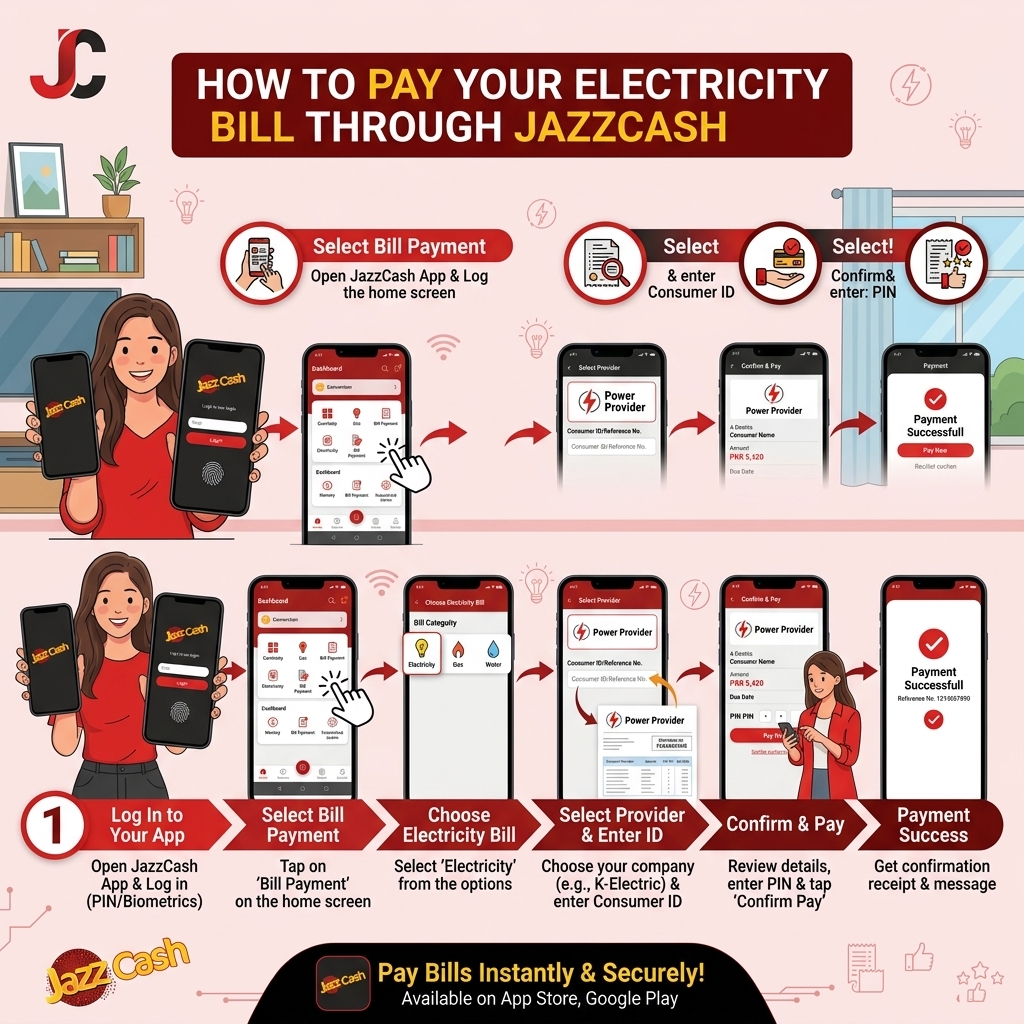
JazzCash is Pakistan's largest mobile wallet, and one of the fastest ways to clear an electricity bill without visiting a bank. Whether it's a FESCO bill in Faisalabad, a K-Electric bill in Karachi, or a HAZECO bill in Abbottabad, the process is the same — all you need is your reference number and a JazzCash account.
There are three ways to do it: through the app, through USSD (no internet needed), or through a JazzCash agent in person. This guide covers all three.
Method 1: Pay Through the JazzCash App (Recommended, Easy & Secure)
This is the fastest option if you have a smartphone and internet.
- Open the JazzCash app and log in with your registered mobile number and 4-digit MPIN. The following screen is open in your mobile that is shown in the image below.
- On the home screen, tap Bill Payments (sometimes shown as Utility Bills) (shown in the above image).
- Select Electricity that show in the second icon click on it.
- Choose your bill company in drop down list of DISCO (show in Above image)— K-Electric, PESCO, HESCO, QESCO, TESCO, HAZECO, LESCO, FESCO, IESCO, MEPCO, SEPCO, GEPCO
- Enter your 14-digit reference number that show in picture (or the 13-digit account number if you're paying a K-Electric bill) — or scan the barcode printed on your bill if your app supports it.
- Your bill amount and due date load automatically. Double-check they match what's on your actual bill.
- Tap Pay Now, then confirm with your MPIN (That show in the above image).
- Save Your Receipt: After successful payment, you’ll see a confirmation screen with:
- Transaction ID (TID)
- Amount paid
- Date & time
[Jazz Cash Picture 1]
[Jazz Cash Picture 2]
[Bill reference number Image 3 (Jazz cash)]
[Jazz Cash Picture 4]
New to JazzCash? If your Jazz number isn't registered yet, the app walks you through a one-time signup using your CNIC, biometrics through your finger and face before you can make your first payment.
Method 2: Pay Electricity Bill via JazzCash USSD (*786#) – No App Needed
Use this if you have a Jazz SIM but no smartphone or don’t want to use the app.
- Step 1 – Dial *786#: From your jazz mobile, dial *786# and press call.
- Step 2 – Select “Pay Bills”: From the menu, reply with the option for “Pay Bills” (usually option 5).
- Step 3 – Choose “Electricity”: Select Electricity from the list (e.g., option 1).
- Step 4 – Select Your DISCO: Choose your company: K‑Electric, PESCO, HESCO, QESCO, TESCO, HAZECO, LESCO, FESCO, IESCO, MEPCO, etc.
- Step 5 – Enter Reference / Account Number: Enter your 14‑digit reference number (or 13‑digit for K‑Electric).
- Step 6 – Confirm Amount and Pay: The screen will show your bill amount and due date. Confirm by replying 1 (or as instructed). Enter your 4‑digit MPIN.
- Step 7 – Save SMS Receipt: You’ll receive an SMS confirmation with transaction details. Keep it as proof.
Method 3: Pay Through a JazzCash Agent
If you'd rather pay in cash without using your own wallet balance, any JazzCash agent, franchise, or retail shop can process the payment for you.
- Find a nearby agent — most mobile phone shops, general stores, and mobile-load points across Pakistan act as JazzCash agents. You can also send "M" to 2179 or call 111-124-444 to locate one.
- Hand over your electricity bill (paper copy or the digital one from Bill Check Online) along with cash for the due amount.
- Tell the Agent to Pay Your Electricity Bill: Say: “I want to pay my electricity bill via JazzCash.” Provide: Your DISCO name, Your reference/account number, The exact bill amount in cash.
- The agent enters your reference number and processes the payment on their end.
- Ask the agent to confirm the transaction and, if possible, stamp your bill copy with the transaction ID and agent ID.
- You should also receive a confirmation SMS on your registered mobile number.
Utility bills above Rs. 50,000 usually cannot be paid at franchises/agents; use the app or bank channels for large amounts.
Tip: This method is especially useful for older family members or anyone without a smartphone, and it's common practice in smaller towns where in-person agents are more trusted than app-based payments.
JazzCash Bill Payment Charges & Limits
- Service charge: JazzCash does not charge extra for utility bill payments via app, USSD or agents (standard DISCO rules apply).
- Transaction limits:
- App: up to Rs. 500,000 per transaction (subject to your account tier).
- USSD (*786#): up to Rs. 25,000 per transaction (may vary by account level).
- Agent/Franchise: typically, up to Rs. 50,000 per bill.
Always check your current limits in the JazzCash app or with your agent.
Fees, Limits, and What to Expect
- Service charge: JazzCash typically applies a small convenience fee for electricity bill payments, generally in the range of Rs. 10–20 depending on the bill amount. This fee is shown clearly on the confirmation screen before you approve the payment — it's separate from the bill total itself.
- Payment limits: Standard residential bills are almost always well within JazzCash's per-transaction limit. For very large commercial or industrial bills, you may hit the transaction ceiling and need to either split the payment or use a bank transfer instead.
- Confirmation: Every successful payment generates both an in-app success message and an SMS with a transaction ID — keep both until your next bill confirms the previous one as paid.
What If Something Goes Wrong?
- Money was deducted but no confirmation appeared: Check your JazzCash transaction history in the app first. If the transaction shows as "Failed" or "Pending," any deducted amount is typically refunded automatically within 24–48 hours.
- The bill amount shown looks wrong: Don't proceed — cross-check it against your actual bill (or your Bill Check Online result) before confirming payment. A mismatch usually means either an outdated reference number or a delay in the DISCO updating its system, not an error on your end.
- Bill still shows "unpaid" after payment: This is usually a short processing delay, especially for payments made in the evening or on a weekend. Give it until the next business day before contacting JazzCash support with your transaction ID.
Contact JazzCash Support If Still Not Updated
Sometimes your JazzCash payment is successful but your DISCO portal still shows “unpaid” for a few hours. Follow these steps:
- Wait 2–6 Hours: Most payments reflect within 15–30 minutes, but for some DISCOs (including K‑Electric), allow up to 2–6 hours.
- Contact JazzCash Support If Still Not Updated: If after 24 hours your DISCO still shows unpaid:
- Call JazzCash Helpline: 4444 (from Jazz) or 021‑111‑124‑444 (other networks).
- Provide: Your JazzCash number, Transaction ID (TID), DISCO name and reference number, Payment date & amount.