
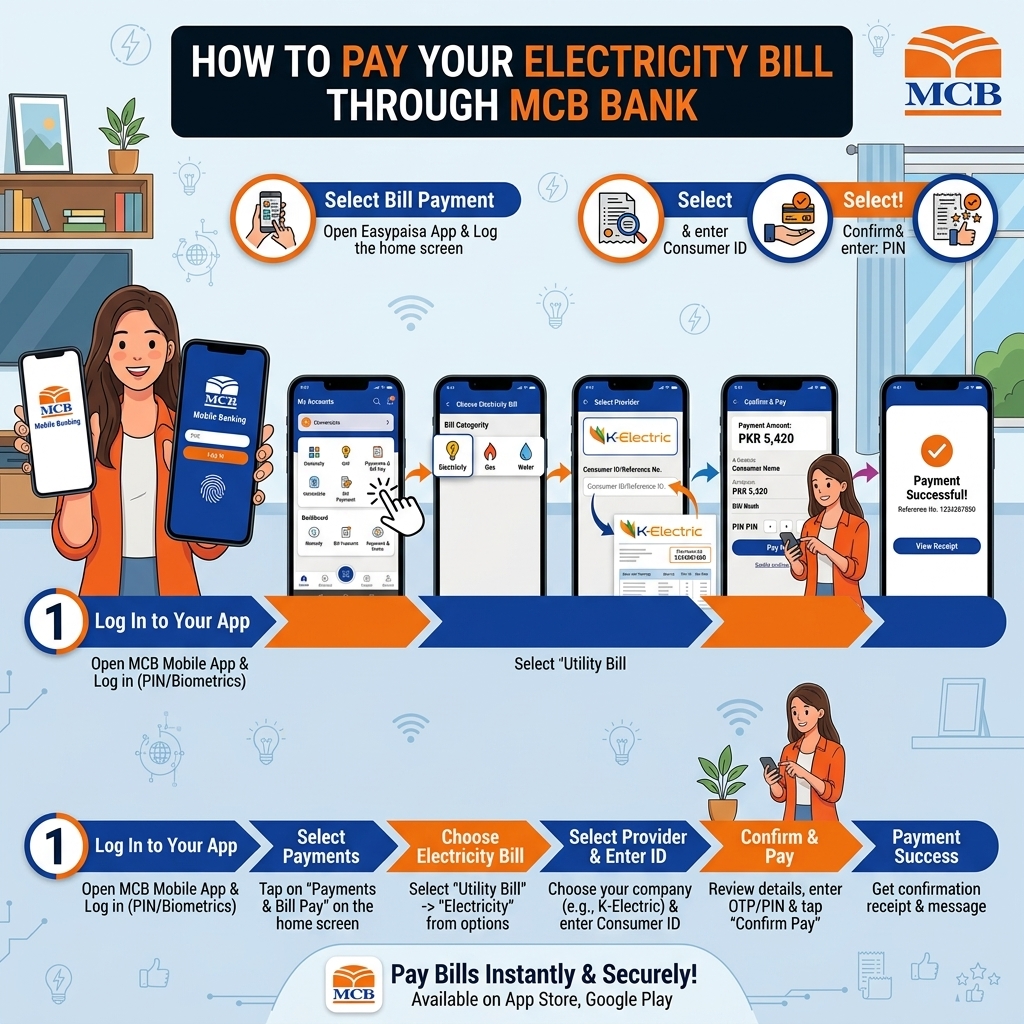
Pay Your Electricity Bill Through MCB Bank
MCB is one of Pakistan's largest banks, and its digital banking platform, MCB Live, supports bill payments to over 1,000 billers. Beyond the standard app, MCB also offers MCB Lite for branchless banking, ATM access nationwide, and — notably — full bill payment support through the Roshan Digital Account, MCB's dedicated banking product for overseas Pakistanis.
Quick Summary: Paying Your Bills via MCB
- MCB Live App: Log in → Pay Bills → Utility Bills → add/select biller → enter reference → fetch bill → confirm → T‑PIN/OTP.
- Internet Banking: Log in → Payments → Bill Payments → add/select biller → enter reference → pay → T‑PIN.
- ATM: Insert card → Bill Payment → select biller → enter reference & amount → confirm → collect receipt.
- Phone Banking: Dial 042‑111‑000‑622 → follow IVR/agent → provide card & bill details → confirm.
- Branch: Visit an MCB branch with bill/reference → pay in cash/debit → get stamped receipt.
All methods are secure, and give you a digital/SMS/printed receipt for proof.
Method 1: MCB Live (Mobile App or Internet Banking)
The main option for existing MCB account holders, available as both a mobile app and a web-based internet banking portal.
- Log in to MCB Live through the app or the web portal.
- Go to Bill Payments, then Register Biller if this is your first time paying this particular bill.
- Select your DISCO — LESCO, FESCO, MEPCO, GEPCO, PESCO, HESCO, QESCO, TESCO, HAZECO, SEPCO, IESCO — or K-Electric.
- Enter your 14-digit reference number (or 13-digit account number for K-Electric) as the consumer number, and give it a nickname for easy reference later.
- Submit, then confirm — you'll receive an auto-generated OTP by SMS to verify the biller registration.
- Once registered, go to Bill Payments → Pay Bills, select the biller and your source account, and submit the payment.
- Confirm the transaction, and you'll receive on-screen, email, and SMS confirmation.
Good to know: Since MCB Live requires registering a biller before the first payment, it's slightly more set up than some apps — but once registered, future months only take a couple of taps, since the biller and nickname are saved.
Method 2: MCB Lite (Branchless Banking)
MCB Lite is MCB's lighter, branchless banking option — a good fit if you want mobile-based bill payments without opening a full MCB current or savings account.
- Download and register for MCB Live using your CNIC and mobile number.
- Log in and go to the Bill Payments section.
- Select Electricity, then your DISCO or K-Electric.
- Enter your reference number and confirm the loaded bill amount.
- Authorize the payment with your PIN.
- You'll receive a confirmation once processed.
Good for: anyone who wants MCB's backing without the paperwork of a full bank account — similar in spirit to UBL Omni or myABL Wallet.
Method 3: MCB ATM
Available around the clock at MCB's nationwide ATM network for debit cardholders.
- Insert your MCB Debit Card at any MCB ATM and enter your PIN.
- Select Bill Payment or Utility Bills from the ATM menu.
- Choose Electricity, then your DISCO or K-Electric.
- Enter your reference number on the keypad.
- Confirm the amount shown.
- Complete the transaction and collect your printed receipt as proof of payment.
Method 4: Roshan Digital Account (For Overseas Pakistanis)
This is where MCB stands out for a specific group of consumers. If you're a Non-Resident Pakistani (NRP) living abroad — including in Saudi Arabia, the UK, the UAE, or elsewhere — Roshan Digital Account (RDA) lets you manage banking, including electricity bill payments, entirely from outside Pakistan.
- Apply for a Roshan Digital Account remotely through the MCB Digital Account Portal — the account can be opened without visiting a branch, and MCB is required to complete due diligence within 48 hours.
- Fund the account through a formal inward remittance (bank transfer or recognized money Transfer Company).
- Once active, log in through the RDA's mobile banking platform.
- Go to Bill Payments, select your DISCO or K-Electric, and enter the reference number of the property or family member's bill you're paying.
- Confirm and complete the payment — funds are drawn directly from your RDA balance.
Especially useful for: overseas Pakistanis paying an electricity bill for a family home, a rental property, or a parent's house back in Pakistan, without needing a local bank account or asking a relative to pay on their behalf.
Which MCB Method Should You Use?
| Method | Best For | Needs Full MCB Account? |
|---|---|---|
| MCB Live | Existing account holders, ongoing bill management | Yes |
| MCB Lite | Branchless, lighter setup | No (Lite account only) |
| MCB ATM | Quick in-person payment, 24/7 access | Yes (MCB debit card) |
| Roshan Digital Account | Overseas Pakistanis paying bills remotely | Yes (RDA specifically) |
Transaction limits:
- Depend on your account type, channel (app/Internet Banking/ATM), and security settings.
- Typical daily limits for bill payments via MCB Live/Internet Banking can range from Rs. 50,000 to several hundred thousand, depending on your profile and device binding.
Always check your current limits in the MCB Live App → Settings/Profile → Limits or on MCB’s website.