
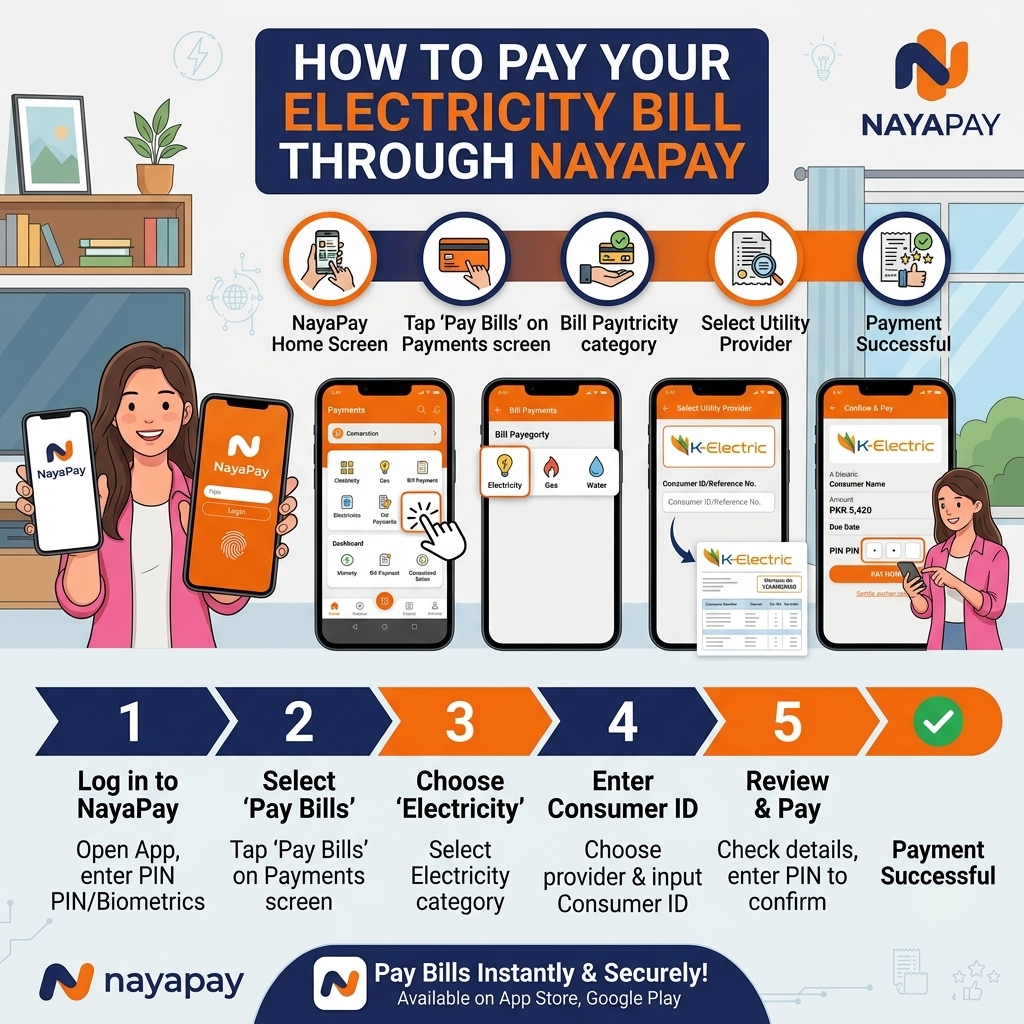
Pay Your Electricity Bill through NayaPay in Under 2 Minutes
NayaPay is a fully digital financial app built around a free Visa debit card, zero-fee bank transfers, and international remittance support — and bill payments are one of its core features, covering over 1,100 billers including K-Electric, LESCO, and MEPCO, along with the rest of Pakistan's DISCOs.
One thing worth knowing before you start: NayaPay has no physical retail agents, unlike JazzCash or Easypaisa. Everything happens inside the app, funded from a linked bank transfer, Raast, or your NayaPay balance. If you're the kind of person who prefers handing cash to a shopkeeper, JazzCash or Easypaisa's agent networks will suit you better — but if you already manage money digitally, NayaPay's bill payment flow is one of the cleanest available.
This is the only way to pay a bill through NayaPay — there's no USSD or agent alternative, so make sure you have the app installed and your account funded before your due date.
- Open the NayaPay app and log in.
- Tap Bills from the home screen second icon.
- Search for or select your DISCO — LESCO, FESCO, MEPCO, GEPCO, PESCO, HESCO, QESCO, TESCO, HAZECO, SEPCO, IESCO — or K-Electric.
- Enter your 14-digit reference number (or the 13-digit account number for K-Electric), or use the app's scan feature if your bill has a barcode.
- Your bill amount and due date load automatically. Confirm they match your actual bill.
- Tap Pay, then authorize with your PIN or biometric login.
- You'll get an instant confirmation in-app, plus a notification you can refer back to later — NayaPay keeps a running bill history so you don't need to save a separate screenshot each time.
New to NayaPay? Signup takes a few minutes with just your CNIC; verify with biometrics— you get a free virtual Visa debit card immediately, and can order a physical "Electric Orange" Visa card afterward if you want one for ATM withdrawals or in-store use.
Getting Money Into Your NayaPay Account First
Since there's no cash-deposit agent network, you'll need to fund your NayaPay balance one of these ways before paying a bill:
- Bank transfer — free, instant transfers from any Pakistani bank account into your NayaPay wallet.
- Raast — link your Raast ID to send money into NayaPay directly.
- Debit card top-up — add funds using a linked debit card.
If you already keep money in NayaPay for everyday spending (its Visa card doubles as a shopping and remittance-receiving tool), bill payment is just one more use of a balance you're likely already managing.
A Few Features Specific to NayaPay's Bill Payment Flow
- Bill reminders. NayaPay proactively notifies you before a bill is due, which is useful if you manage several connections — a home, a shop, or a family member's property — and don't want to rely on manually remembering due dates.
- Pay multiple bills in one go. If you have more than one connection registered, NayaPay's Business and personal tools both support batching payments instead of repeating the process for each bill separately.
- Bill Split. If you share a connection's cost with roommates or business partners, NayaPay's Bill Split feature can divide a bill and collect each person's share directly through the app — a genuinely useful option for shared apartments or co-tenanted shops.
- Service charge: NayaPay does not charge extra for utility bill payments via the app (standard DISCO rules apply).
- Transaction limits:
- Depend on your account tier and KYC level (fully verified accounts have higher limits).
- Typical wallet limits can go up to several hundred thousand rupees per month; exact limits are shown in the app under Limits or Profile.
Always check your current limits in the NayaPay app on the Apple Store.
- Always double‑check the DISCO name and reference number before paying.
- Compare the consumer name shown in the app with your bill.
- Save the transaction ID and receipt/screenshot until the next bill shows “paid”.
- Use the official NayaPay app from Google Play / App Store; avoid third‑party apps.play.
- Keep your MPIN and OTP secret; never share them with anyone.