
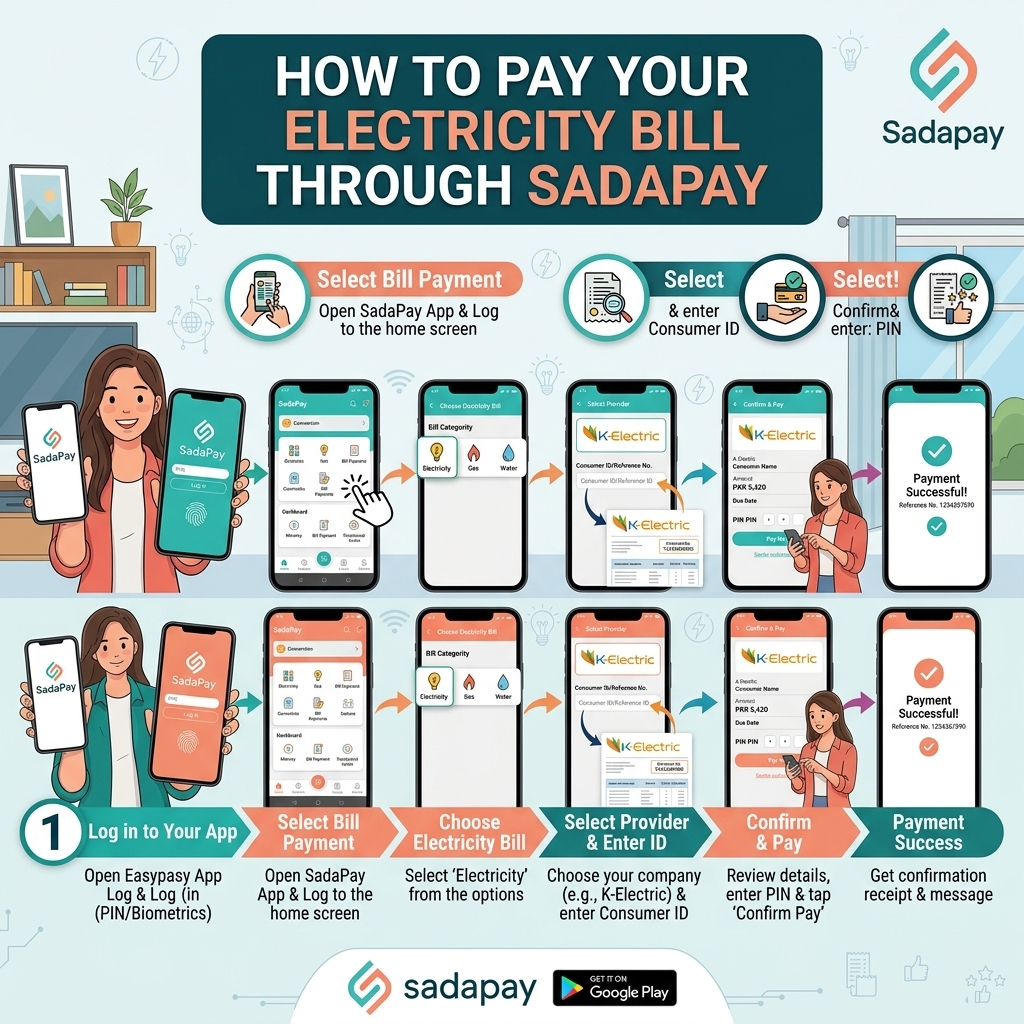
Before You Start – What You Need to Pay via SadaPay
Make sure you have:
- A SadaPay mobile wallet account (CNIC‑verified, with MPIN set).
-
Your electricity bill or at least your reference/account number:
- Most DISCOs: 14‑digit reference number
- K‑Electric: 13‑digit account number.
- Sufficient balance in your SadaPay wallet (loaded via bank transfer, card, etc.).
Method: Pay Electricity Bill via SadaPay App (Only Available Method)
SadaPay currently supports bill payments through its mobile app only (no USSD code). The process is similar for all DISCOs.
Step 1 – Open the SadaPay App and Log In
- Open the SadaPay app on your phone.
- Log in with your MPIN (or biometric if enabled).
Step 2 – Go to “Payments” → “Bills & Utilities”
From the bottom navigation bar:
- Tap “Payments”.
- Then tap “Bills & Utilities” (sometimes shown as “Bill Payments” or “Utilities”).
Step 3 – Select “Electricity” or Search Your DISCO
- In the list of billers, look for Electricity or directly search your DISCO name, for example:
LESCO, FESCO, MEPCO, GEPCO, PESCO, HESCO, QESCO, TESCO, HAZECO, SEPCO, IESCO — or K-Electric.
SadaPay supports 900+ billers, including all major Pakistani DISCOs.
Step 4 – Add New Biller / Enter Reference Number
- Tap “Add New” or “New Bill Payment”.
- Enter your 14‑digit reference number (for most DISCOs) or 13‑digit account number (for K‑Electric).
- Tap “Next” or “Proceed”.
The app will fetch your bill details from the DISCO’s system.
Step 5 – Review Bill Details
Check on screen:
- Consumer name
- Bill amount
- Due date
- Billing month (if shown)
If anything looks wrong, do not proceed. Compare with your printed bill or re‑check the reference number.
Step 6 – Confirm and Pay
- Tap “Pay” or “Pay Now”.
- Authorise the payment using your MPIN and/or fingerprint (as enabled).
Step 7 – Save Your Receipt
-
After successful payment, you’ll see a confirmation screen with:
- Transaction ID / Reference
- Amount paid
- Date & time
- You’ll also receive an in‑app receipt and often an SMS/email (depending on your notification settings).
- Save a screenshot or download the receipt from the app for your records.
Payment usually posts to your DISCO account within minutes to a few hours. For K‑Electric, allow up to 2–6 hours in some cases.
What Makes SadaPay Worth Using for This
SadaPay built its reputation on being the "clean, boring, no-surprises" wallet — no SMS OTP friction, no hidden fee lines buried in a receipt, and a support team that answers in-app chat like a person rather than a script. For something as unglamorous as an electricity bill, boring is exactly what you want. You're not trying to be delighted by the experience of paying LESCO — you just want it to work, every single month, without a fee eating into the amount and without wondering if the payment actually landed.
That said, SadaPay isn't built around cash. If you're someone who likes handing rupees to a shopkeeper and walking away with a stamped receipt, this isn't your app — JazzCash or Easypaisa's agent networks suit that habit far better. SadaPay assumes your money already lives digitally, in a bank account or on a card, and just needs to move from there to your DISCO.
Setting Up, If You Haven't Already
A SadaPay account takes about as long to open as this section takes to read: download the app, enter your CNIC and mobile number, verify your identity, and you're issued a virtual Visa card on the spot. A physical card can follow by mail if you want one for ATM withdrawals, but you don't need it for bill payments.
Before your first bill payment, get some money into the wallet. The usual route is a bank transfer from any Pakistani bank, or linking a debit card for a top-up. Some partner locations also accept cash-in, though this isn't as universal as JazzCash or Easypaisa's agent networks — don't count on finding one nearby without checking the app first.
On Fees — or the Lack of Them
SadaPay markets bill payments as fee-free, and for most standard electricity bills, that holds. There's no small "convenience charge" quietly added the way some wallets do. It's worth glancing at SadaPay's current Schedule of Charges occasionally, since fee structures across all Pakistani fintechs get revised from time to time, but as a baseline, paying your bill through SadaPay shouldn't cost you anything beyond the bill itself.
Tips to Pay Your Electricity Bill Safely via SadaPay
- Always double‑check the DISCO name and reference number before paying.
- Compare the consumer name shown in the app with your bill.
- Save the transaction ID and in‑app/SMS receipt until the next bill shows “paid”.
- Use the official SadaPay app from Google Play / Apple Store; avoid third‑party apps.
- Keep your MPIN and OTP secret; never share them with anyone.