
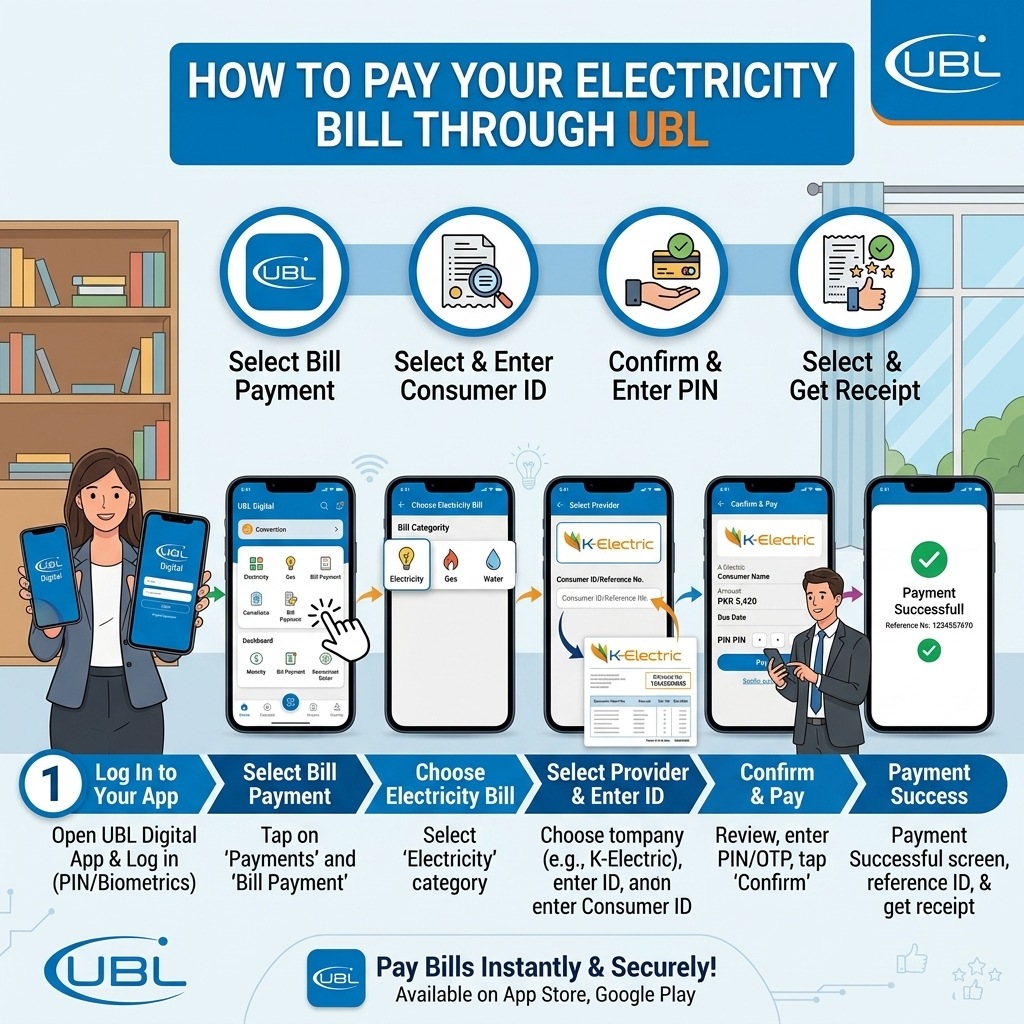
Four Ways to Pay Your Electricity Bill With UBL
United Bank Limited (UBL) offers one of the more complete bill-payment ecosystems among Pakistani banks — a full mobile app for account holders, a no-account-needed branchless option through UBL Omni, web-based NetBanking, and ATM access. This guide covers all four, so you can pick whichever fits how you already bank.
Method 1: UBL Digital App (For UBL Account Holders)
The most complete option if you already have a UBL bank account.
- Open the UBL Digital App and log in with biometric or PIN authentication.
- Tap Payments, then select Utility Bills.
- Choose Electricity, then your DISCO — LESCO, FESCO, MEPCO, GEPCO, PESCO, HESCO, QESCO, TESCO, HAZECO, SEPCO, IESCO — or K-Electric.
- Enter your 14-digit reference number (or 13-digit account number for K-Electric).
- Confirm the bill amount and due date that load automatically.
- Select which UBL account to pay from, then authorize with your MPIN, OTP, or biometric login.
- You'll get an instant in-app confirmation, and the transaction will appear in your account statement.
Useful extras: UBL Digital lets you schedule recurring bill payments (monthly or weekly) so they're handled automatically, and supports paying multiple utility bills in a single transaction — useful if you're managing more than one connection.
Method 2: UBL Omni (No Traditional Bank Account Needed)
UBL Omni is UBL's branchless banking service, built around a mobile account and a network of "Omni Dukaans" (retail agent shops) — a good option if you don't hold a formal UBL bank account.
Through the Omni Mobile Account app or USSD:
- Open your Omni Mobile Account access channel (app or USSD menu) and log in.
- Select Bill Payment.
- Choose Electricity, then your DISCO or K-Electric.
- Enter your reference number and confirm the amount.
- Authorize with your PIN — you'll get a confirmation SMS.
Through an Omni Dukaan (in person):
- Locate a nearby UBL Omni Dukaan — these retail points are widespread across cities and smaller towns alike.
- Bring your bill (paper or your Bill Check Online printout) and cash for the amount due.
- The agent processes the payment and confirms it — UBL states there's no charge for bill payments made at Omni Dukaans, which makes this one of the more cost-effective in-person options available.
Method 3: UBL NetBanking (Web-Based, From Any Computer)
If you'd rather pay from a laptop or desktop browser instead of a phone.
- Log in to UBL NetBanking at ubldigital.com using your registered credentials.
- Go to My Payments, then Bills Management.
- Select Electricity, then your DISCO or K-Electric from the supported companies list.
- Enter your reference number and confirm the loaded bill.
- Choose to pay it instantly, or schedule it as a recurring monthly or weekly payment — a feature NetBanking handles particularly well for people who'd rather not think about it each month.
- Confirm and save or print the transaction confirmation.
Method 4: UBL ATM
A quick, in-person option if you have a UBL debit card, available 24/7.
- Insert your UBL debit card at any UBL ATM and enter your PIN.
- Select Bill Payments from the ATM menu.
- Choose Electricity, then your DISCO or K-Electric.
- Enter your reference number and confirm the amount shown.
- Complete the transaction and take the printed receipt as proof of payment.
Which UBL Method Should You Use?
| Method | Best For | Needs UBL Bank Account? | Fee |
|---|---|---|---|
| UBL Digital App | Existing account holders, recurring payments | Yes | Usually free; nominal fee possible for some providers |
| UBL Omni | No formal bank account, in-person cash payment | No (Omni mobile account only) | Free at Omni Dukaans |
| UBL NetBanking | Desktop/browser users, scheduled payments | Yes | Usually free |
| UBL ATM | Quick in-person payment, 24/7 access | Yes (UBL debit card) | Usually free |
Transaction limits:
- Depend on your account type, channel (app/NetBanking/ATM/Omni), and security settings.
- Typical daily limits for bill payments via UBL Digital/NetBanking can range from Rs. 50,000 to several hundred thousand, depending on your profile and device binding.
Always check your current limits in UBL Digital App → Settings/Profile → Limits or on UBL’s website.
Tips to Pay Your Bills Safely via UBL
- Always double‑check the biller name and reference/consumer number before paying.
- Compare the consumer name shown in the app/portal with your bill.
- Save the transaction ID and SMS/email receipt until the next bill shows “paid”.
- Use the official UBL Digital App and official UBL websites only; avoid third‑party links.
- Never share your login credentials, TPIN, MPIN, Omni PIN, OTP, or card CVV with anyone.
A Few Things Worth Knowing
- High-value bills may need extra steps. Bills above roughly Rs. 100,000 — more common for commercial or industrial connections — may require branch approval or splitting into smaller payments through the app.
- Pay a day or two early. DISCO-side system updates can take up to 24 hours to reflect a payment, so paying right on the due date carries a small risk of the update landing a day late.
- Reference number errors are usually typos. If a bill fails to load, double-check the number against your bill or a Bill Check Online lookup before assuming there's a technical issue.