
⚡ Quick Summary: Paying Bills via Udhaar Book
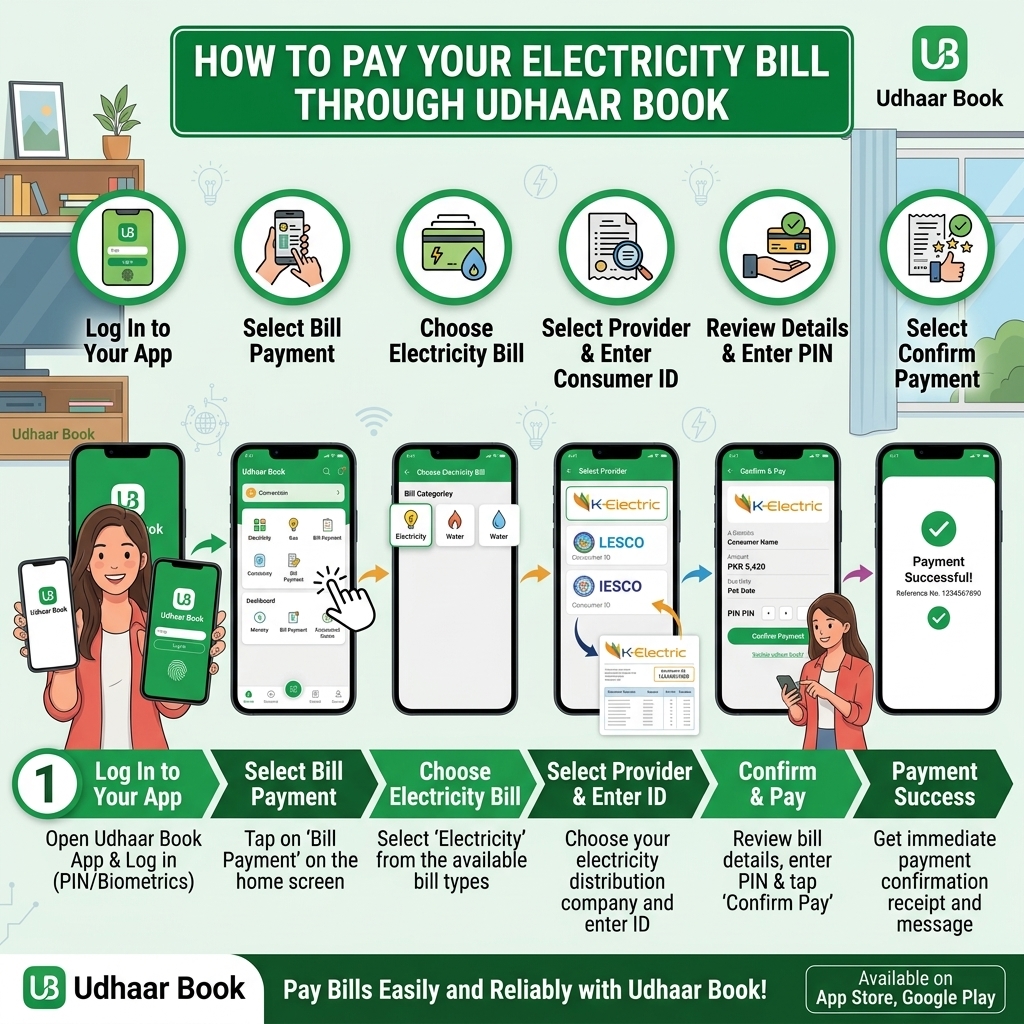
- App: Open Udhaar Book → Money → Bill Payment → Pay Bill → select bill type & vendor → enter reference → verify bill & commission → add customer details → pay → earn commission.
- Wallet: Add money via JazzCash / Easypaisa / Raast / IBFT / bank transfer before paying bills.
- Receipts: Share digital receipts via WhatsApp/SMS; keep transaction IDs for tracking.
- Earning: Earn commission on every successful bill payment (around Rs. 4–12+ per bill, depending on biller).
All payments are digital, secure, and give you a clear record of earnings in the app.
What Is Udhaar Book?
Udhaar Book is Pakistan’s leading digital khata (credit book) and business management app. Along with features like:
- Digital ledger (udhaar/khata)
- Cash in/out tracking
- Stock & inventory management
- Staff attendance & salary
- Digital invoices & receipts
Pay Your Electricity Bill Through Udhaar Book — and Earn Cashback Doing It
Udhaar Book started as a digital ledger app — helping shopkeepers track customer credit (udhaar) without a paper notebook — and has grown into one of Pakistan's most popular bill-payment platforms. The feature that sets it apart from every other app in this guide is that you earn cashback or commission on every electricity bill you pay through it, at no extra cost to you.
Whether it's a K-Electric bill in Karachi, a LESCO bill in Lahore, or a GEPCO bill in Gujranwala, the process is the same. You can pay through the app or the web portal — Udhaar Book doesn't operate physical retail agents the way JazzCash or Easypaisa does, so everything happens digitally.
Method 1: Pay Through the Udhaar Book App
- Download the Udhaar Book app from the Google Play Store (or via udhaar.pk).
- Open the app and go to the Bill Payments section.
- Select Electricity, then choose your DISCO — LESCO, FESCO,{' '} MEPCO, GEPCO,{' '} PESCO, HESCO,{' '} QESCO, TESCO,{' '} HAZECO, SEPCO,{' '} IESCO — or K-Electric.
- Enter your 14-digit reference number (or the 13-digit account number for K-Electric).
- Your bill amount, due date, and billing month load automatically — confirm they match your actual bill.
- Tap Pay Now and choose your funding method — Udhaar Book supports paying via digital wallet balance, debit/credit card, bank transfer, or linked Easypaisa/JazzCash accounts.
- Confirm the payment. You'll get an instant digital receipt, and your cashback or reward is credited to your Udhaar Book account right away.
Method 2: Pay Through the Web Portal
If you'd rather not install an app, Udhaar Book also works from a browser.
- Go to web.udhaar.pk.
- Log in or register with your CNIC and mobile number.
- Select Electricity, then your DISCO (LESCO, MEPCO, FESCO, etc.) or K-Electric.
- Enter your reference number to view the bill.
- Choose your payment method and confirm.
- Your receipt and cashback appear in your account the same way as the app.
The Cashback Feature, Explained
This is Udhaar Book's biggest differentiator, so it's worth understanding properly:
- No extra fee to earn it: Udhaar Book doesn't charge a hidden processing fee for electricity bill payments — the cashback comes out of the app's own incentive program, not an added cost to you.
- Credited instantly: As soon as a bill payment is processed, the cashback or reward lands in your Udhaar Book account immediately, not after a delay.
- Bigger opportunity for shopkeepers: If you run a shop, Udhaar Book's business tools let you process electricity bill payments on behalf of walk-in customers — they hand you their bill and cash, you process it through the app, and you earn a commission on top of whatever else you sell them that day.
- Everything tracked in one dashboard: Whether you're a household paying your own bill or a shop processing dozens a month, Udhaar Book's digital khata (ledger) shows a full history of every bill paid and every reward earned.
Udhaar Book Bill Payment – Key Features & Benefits
- 140+ billers: Electricity, gas, water, internet, government bills, etc.
- Earn commission: Around Rs. 4–12+ per bill depending on biller and current offers.
- Zero investment: No franchise fee or security deposit; just add money to your wallet.
- Digital receipts: Professional, shareable receipts via WhatsApp/SMS.
- Customer management: Store customer details and track who paid which bill.
- Multi‑language: Urdu, Roman Urdu, English, Sindhi, Arabic.
- Secure & backed up: App PIN lock, automatic cloud backup.
Why Shopkeepers in Particular Use Udhaar Book for Bills
Because Udhaar Book began as a shopkeeper's credit-tracking tool, it has a natural fit for small retail businesses that already serve as informal bill-payment points in their neighbourhood — a common feature across Pakistan's markets and mohallas. A shop owner who already lets regular customers buy on credit can now also process their K-Electric, LESCO, PESCO, or MEPCO bill in the same visit, earning a small commission and keeping the customer's overall account — credit and bill payments — in one place.
Complete Payment Guide
Select your electricity company and learn how to pay your DISCO bill with our complete step-by-step guide.