
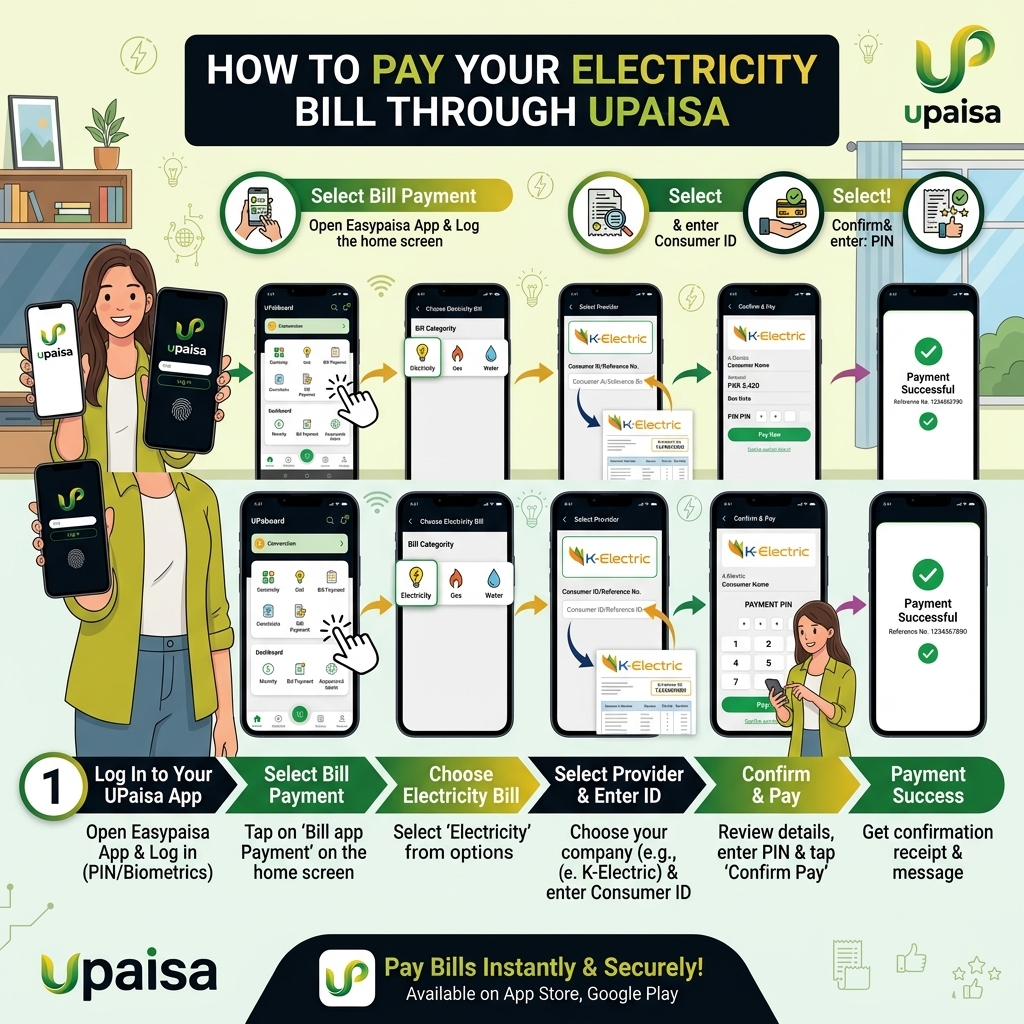
Pay Your Electricity Bill Through UPaisa
UPaisa is U Microfinance Bank's branchless banking wallet, launched in 2013 in partnership with Ufone. What sets it apart from some newer digital wallets is its reach: UPaisa built one of the largest agent networks in Pakistan specifically to bring financial services into smaller towns and remote areas that other apps' agent coverage hasn't reached as deeply. If you're outside a major city, UPaisa is often one of the most reliably available bill-payment options nearby.
Whether it's a QESCO bill in Balochistan, a TESCO bill in the merged tribal districts, or a K-Electric bill in Karachi, UPaisa handles all of them the same way. There are three ways to pay: through the app, through USSD, or through a UPaisa agent in person.
Method 1: Pay Through the UPaisa App
The quickest option if you have a smartphone and data.
- Open the UPaisa app and log in with your registered mobile number and PIN.
- Tap Bill Payments (sometimes shown as Online Bill Payments) from the home screen.
- Select Electricity from the list of utility categories.
- Choose your LESCO, FESCO, MEPCO, GEPCO, PESCO, HESCO, QESCO, TESCO, HAZECO, SEPCO, IESCO — or K-Electric.
- Enter your 14-digit reference number (or the 13-digit account number for K-Electric).
- Confirm the loaded bill amount and due date match your actual bill.
- Tap Pay, then authorize with your PIN.
- You'll receive an instant in-app confirmation along with an SMS containing your transaction reference — keep this until your next bill confirms the payment.
New to UPaisa? You can open a wallet through the app using your CNIC, and it works on any mobile network, not just Ufone.
Method 2: Pay Through USSD (7862#) — No Internet Needed
A reliable backup for areas with weak signal, or for anyone without a smartphone.
- Dial *786# from your registered mobile number.
- Select UServices, then navigate to Bill Payments.
- Choose Electricity, then select your DISCO from the list.
- Enter your reference number when prompted.
- Confirm the amount shown.
- Enter your MPIN to complete the transaction.
You'll receive a confirmation SMS once the payment is processed, the same as with the app.
Method 3: Pay Through a UPaisa Agent
This is where UPaisa's network genuinely stands out — its agent footprint reaches deep into smaller towns and rural areas across Pakistan, making it one of the most accessible cash-payment options outside major cities.
- Locate a nearby UPaisa shop, Ufone franchise, or Ufone customer care center — these are widespread even in areas where other wallets' agent coverage is thinner.
- Bring your electricity bill (paper copy or your Bill Check Online printout) along with cash for the due amount.
- Give the agent your mobile phone number so they can process the payment and send you a confirmation SMS.
- Once processed, the agent will typically stamp your physical bill copy as proof of payment — a practice that's especially reassuring for consumers who prefer a physical record alongside the digital confirmation.
Especially useful for: rural households, agricultural tube-well account holders, and anyone in a town without reliable internet access — precisely the kind of consumer UPaisa's network was built to reach.
U‑Paisa Bill Payment Charges & Limits
- Service charge: U‑Paisa does not charge extra for utility bill payments via app, USSD or agents (standard DISCO rules apply).
- Transaction limits:
- App: up to Rs. 250,000 per transaction (subject to your account tier and KYC level).
- USSD (7862#): up to Rs. 25,000 per transaction (may vary by account level).
- Agent/Franchise: typically up to Rs. 50,000 per bill.
What If Something Goes Wrong?
- Payment deducted but no SMS received: Check your UPaisa transaction history in the app first — the confirmation may simply be delayed. If the transaction shows as failed, any deducted amount is generally reversed automatically.
- Bill still shows unpaid after paying: This is usually a short delay on the DISCO's side, especially near a due date when many people pay at once. Give it until the next business day before contacting UPaisa support with your transaction details.
- Wallet shows as dormant or inactive: UPaisa wallets can become dormant after a year without any transaction. If this happens, dial 7777 or call 051-111-282-265 to reactivate your account before attempting a bill payment.
Tips to Pay Your Electricity Bill Safely via U‑Paisa
- Always double‑check the DISCO name and reference number before paying.
- Compare the consumer name shown in the app with your bill.
- Save the transaction ID and SMS receipt until the next bill shows “paid”.
- Use the official U‑Paisa app from Google Play / App Store; avoid third‑party apps.
- Keep your MPIN secret; never share it with anyone, including agents.youtube+1